
The Application UI
Date: 2015-10-07; view: 484.
Figure 1 shows the UI of the .NET-based implementation of the artificial ant. The grid panel is divided into a 32¥32 matrix of squares that contain the trail of food to be retrieved by the ant algorithm. A default trail is loaded at startup. You can use the "Empty Grid" button to remove the trail. The Food and Gap radio buttons allow the user to paint a new trail by clicking in the grid. The "SaveGrid" button outputs the current grid trail to an XML file, which can later be loaded back in with the "Restore Grid" button.
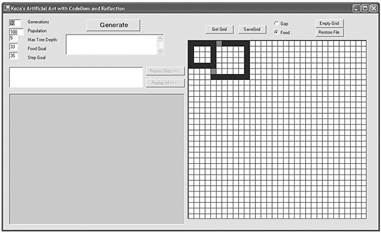
Figure 1 Artificial Ant Application Window
The boxes on the left control GP execution and include the following:
Generations. The algorithm will stop after this number of generations is produced. However, if a perfect ant (an ant that gathers the maximum amount of food in the minimum number of steps) is discovered, the algorithm will immediately halt execution.
Population. This is the number of ants each generation will have. The population will be a mixture of the most efficient ants from the previous generation, together with their children.
Max Tree Depth. The algorithm begins by generating random ants. This setting controls how deep their expression trees can be.
Food Goal and Step. Goal We'd like to breed an ant that will gather this much food in these few steps. By default, these will reflect the food and gap counts in the active grid. However, the computed Step Goal doesn't reflect the turn operations that an ant will need to make when the trail changes direction.
In order to demonstrate the UI and application, let's work through a simple example. Start the application, which should look like Figure 1. There are gap squares that break the connection between the smaller food square to the upper left and the larger food square next to it.
The two squares have a total of 33 food cells and, since there are two gaps, the minimum possible number of steps required to obtain all the food is 35. Recall that the minimum step total doesn't reflect turn operations that are necessary at corners.
Hit the Generate button with the default textbox parameters to start the genetic programming process. This will generate an initial population of 100 ants, each of which will follow a randomly generated strategy. Here, Max Tree Depth is set to 5, so the initial population of ants will have at most five levels of conditional branching, moves, and steps.
The listbox beneath the Generate button shows summary data about each generation. This is the average "fitness" of the generation, and the fitness of the best and worst ants. I'll define fitness later; at this point all that's necessary is that you realize that higher fitness is better.
 When the tenth generation is completed, select the generation summary from Generation 1, and all of the ants in that generation appear in the listbox beneath it. Each ant represents a randomly generated class. The name of each ant is shown with the amount of food it gathered and the number of steps it took. The name of the ant class is GenX_AntY, where X is the generation number and Y is the ant number within that generation. The best ant from a generation always appears at the top of the listbox. Select that top ant from Generation 1.
When an ant is selected, detailed information about it is displayed in the textbox beneath it. This will show the parents of the ant—that is, the name of the classes from which it was generated. Below the list of the parents, the generated code for the selected ant will be listed. I'll describe the code in more detail later.
Figure 2 Poor Performance
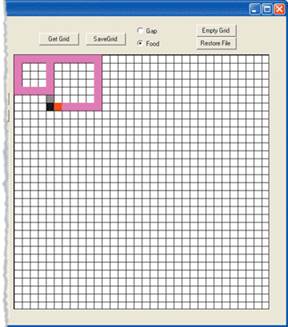 When an ant is selected, two buttons are activated. Replay Step allows the user to step slowly through the trail that the ant made, one move at a time. Replay All automatically walks the entire trail. Figure 2 shows the UI display when Replay All is clicked for the best ant in Generation 1. The generated code, the lineage information about ants, and the display of the trail they took provide excellent tools for studying a genetic algorithm. The best ant in Generation 1 gathered only 18 items of food, taking the maximum allowable 400 steps. Its trail display in Figure 2 shows why it is so poor. Note that since the logic for each ant is generated with some degree of randomness, your results may vary slightly.
Figure 3 Ant Trail in 45 Steps
Next, scroll down the Generations listbox to select Generation 10. Select its best ant, the one at the top of the ant listbox. This ant evolved by selecting and combining the most efficient food gatherers from prior generations. This ant gathered 33 items of food in only 45 steps. Its trail is displayed in Figure 3. Clearly it is following a strategy that is far more efficient for this trail.
| <== previous lecture | | | next lecture ==> |
| The Sample Problem | | | High-Level Class Design |